The “Require Login” setting is essential when using the WP Travel Partial Payments add-on. This feature ensures that each booking is securely linked to a customer’s account, enabling travelers to manage their bookings, view payment statuses, and complete any outstanding payments directly from their User Dashboard.
Since partial payments involve multiple transactions, every booking must be associated with a registered customer account. Enabling the Require Login option allows WP Travel to securely track bookings, payment history, and outstanding balances throughout the payment process.
Where Can You Find the Required Login Option?
The Require Login option is available in the WP Travel settings.
Navigate to: WP Admin → WP Travel → Settings → Account→ Require Login
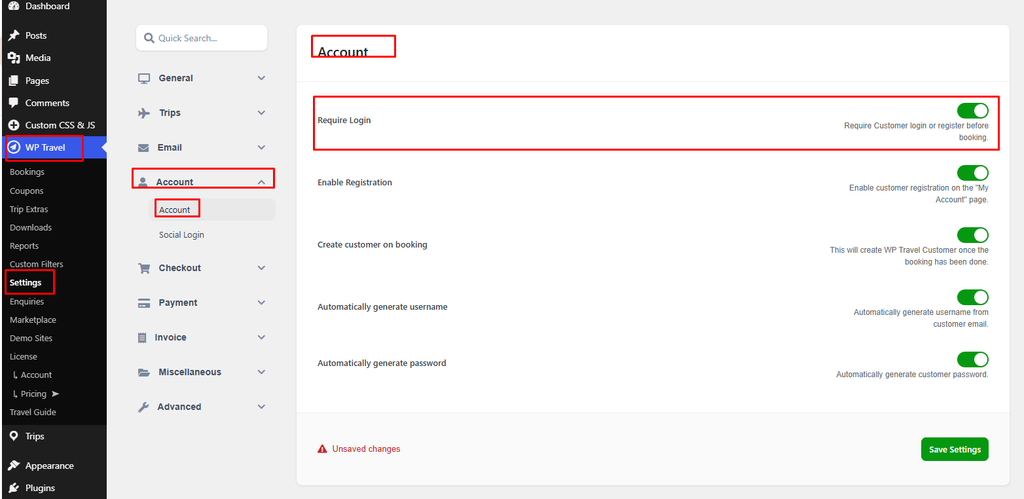
Enable this option to require customers to sign in before completing a booking. This setting must be activated when using the WP Travel Partial Payments add-on to ensure that every booking is linked to a registered customer account.
Why Is Login Required?
When a customer selects the Partial Payment option during checkout, WP Travel creates a booking and links it to the customer’s user account. This link allows the plugin to securely manage future payments and maintain an accurate payment history.
Enabling Require Login provides several advantages:
- Securely links bookings to the correct customer.
- Allows customers to access their bookings from the User Dashboard.
- Enables customers to pay the remaining balance at a later date.
- Displays payment history and outstanding amounts.
How Partial Payments Work
With Require Login enabled, the booking and payment process follows this workflow:
- The customer logs into an existing account or creates a new one.
- The customer selects a trip and proceeds to checkout.
- The customer chooses the Partial Payment option, if available.
- The initial payment is completed successfully.
- WP Travel creates the booking and associates it with the customer’s account.
- The customer can then return at any time and navigate to User Dashboard → Bookings.
What Happens If Require Login Is Disabled?
If the Require Login option is disabled while using the WP Travel Partial Payments addon:
- Customers can complete the initial booking as guests.
- Guest bookings are not associated with a registered user account.
- Customers will not be able to access their bookings from the User Dashboard.
- They cannot view their payment history or outstanding balances.
- They cannot pay the remaining balance through their dashboard.
- Site administrators may need to manually manage outstanding payments and assist customers.
Best Practices
To ensure the proper functioning of the WP Travel Partial Payments addon:
- Always enable Require Login before activating Partial Payments.
- Allow customers to create an account during checkout for a smoother booking experience.
- Inform customers that an account is necessary for managing future payments.
- Test the booking workflow after enabling Partial Payments to ensure everything operates correctly.
- Encourage customers to use their User Dashboard to monitor their payment status and complete remaining balances.
Conclusion
The Require Login setting is a crucial configuration for the WP Travel Partial Payments addon. It guarantees that every booking is securely linked to a registered customer account, enabling customers to manage their bookings, review payment history, and finalize outstanding payments directly from their User Dashboard.
Keeping this setting enabled ensures a secure and seamless payment experience for customers while simplifying booking and payment management for site administrators.
Check the WP Travel documentation to learn more about configurations, modules, payments, and shortcodes.
Your feedback helps us improve. Feel free to share your thoughts!
Need assistance? Contact our support team, join our Facebook community, and subscribe to our YouTube Channel for video tutorials.
You can also find us on Facebook, Instagram, LinkedIn, TikTok, and X. Thank you for choosing WP Travel.
If you are a WP Travel Free user thinking about upgrading to Pro, simply click on the banner below.


WP Travel Editorial is a team of WordPress and travel industry experts dedicated to delivering technical resources, travel business guides, and general travel insights. With over 10 years of experience, the team provides in-depth release notes, feature updates, and informative articles to help tour operators and travel enthusiasts succeed in the evolving travel landscape.
From plugin updates and industry trends to practical travel resources, WP Travel Editorial shares valuable content that supports both the travel industry and avid travelers.